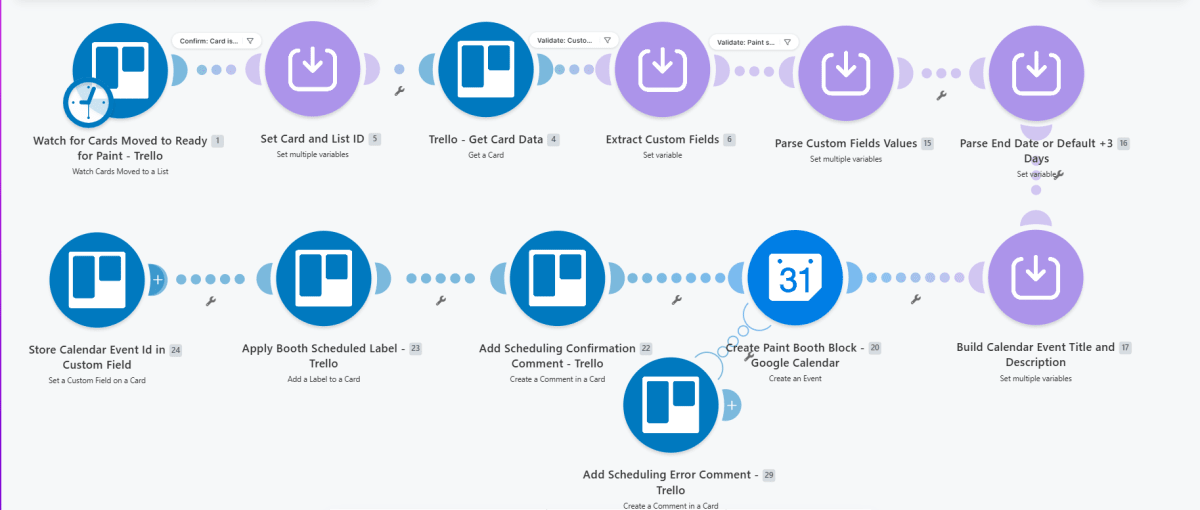
Scheduling workflow that watches Trello cards moved to a Ready‑for‑Paint list, parses custom‑field dates, creates a Google Calendar paint‑booth block, writes the event ID back to the card, and marks it as scheduled, with error comments on the same card if booking fails.
Make · workflow canvasproduction build
Context
Operations teams managing paint‑booth usage needed to avoid double‑booking while manually reading Trello cards, calculating dates, and updating calendars, which slowed down scheduling and increased conflicts.
Approach
Built a single Make.com scenario that triggers when a card is moved into the Ready‑for‑Paint list, retrieves and parses custom‑field scheduling data, resolves an end date (or defaults to +3 days), creates a paint‑booth block in Google Calendar, stores the event ID on the Trello card, applies a scheduled label, and adds a confirmation comment; if scheduling fails, an error comment is added instead.