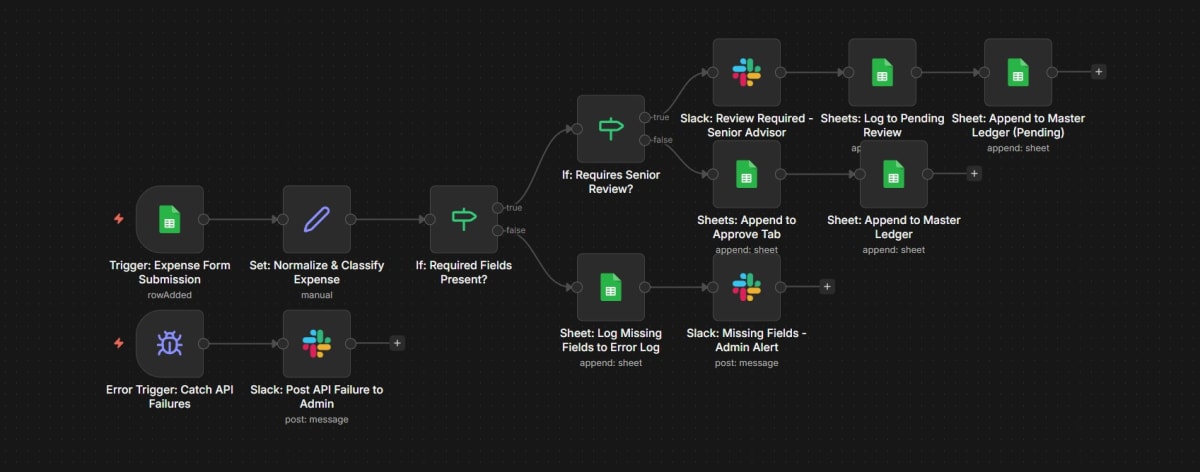
Expense approval workflow that processes form submissions, normalizes and classifies expenses, validates required fields, routes non-senior-review expenses directly to approval and ledger, sends senior-review expenses to Slack alert and pending review before ledger, logs missing-field submissions to error log with admin Slack alert, and catches API failures with a Slack admin report.
n8n · workflow canvasproduction build
Context
A finance team needed a structured multi-tier expense approval process that separates standard expenses from those requiring senior review, keeps clear audit logs in Google Sheets, and ensures admins are notified when submissions are incomplete or when API failures occur.
Approach
Built a two-part n8n workflow system with a Google Sheets expense intake trigger and a separate API failure error trigger. The main flow normalizes and classifies the expense, validates required fields, branches on whether senior review is needed, routes non-senior-review expenses to the approval tab and master ledger, sends senior-review expenses to a Slack alert and pending review sheet before ledger entry, logs missing-field submissions to an error log with an admin Slack alert, and posts Slack failure reports for API errors.