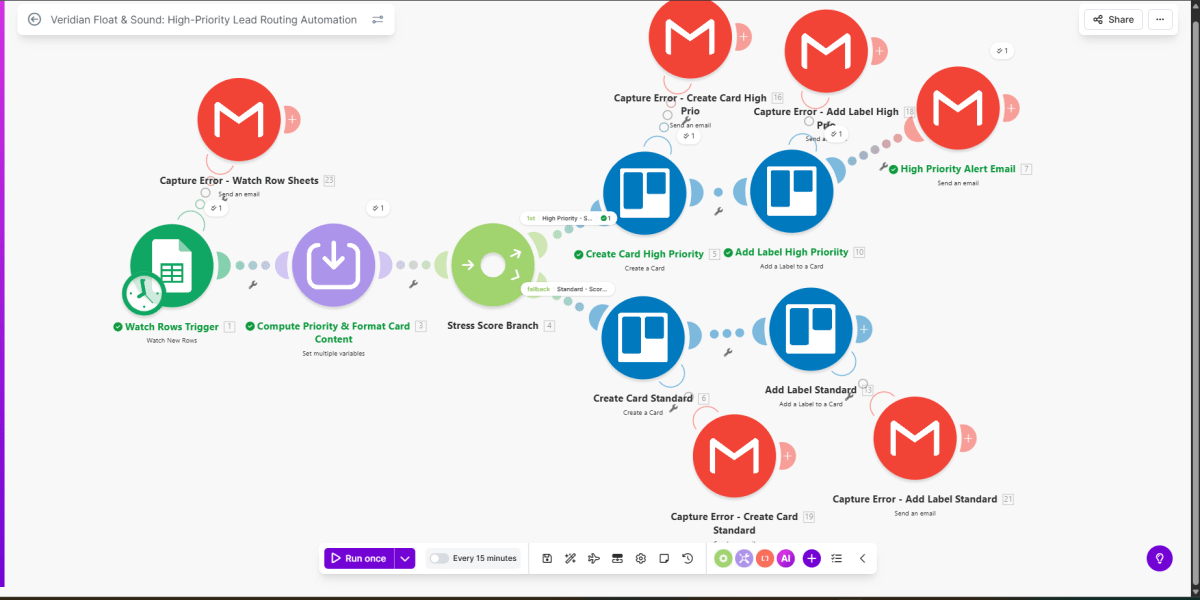
Lead routing workflow that watches new rows in a lead sheet, computes a priority (stress) score, formats Trello card content, and routes high‑priority and standard leads into the appropriate Trello paths with dedicated email alerts and error capture for each step.
Make · workflow canvasproduction build
Context
The team needed a fast way to distinguish high‑stress or urgent leads from standard ones as soon as they landed in the lead sheet, and surface them immediately to the right people without manual triage.
Approach
Built a single Make.com scenario that watches the lead sheet, computes a priority score, formats Trello card text, and routes records into high‑priority or standard branches; each branch creates a Trello card, applies a label, and sends an alert email, with separate error‑capture emails for the watch trigger, card creation, and labeling steps on both branches.