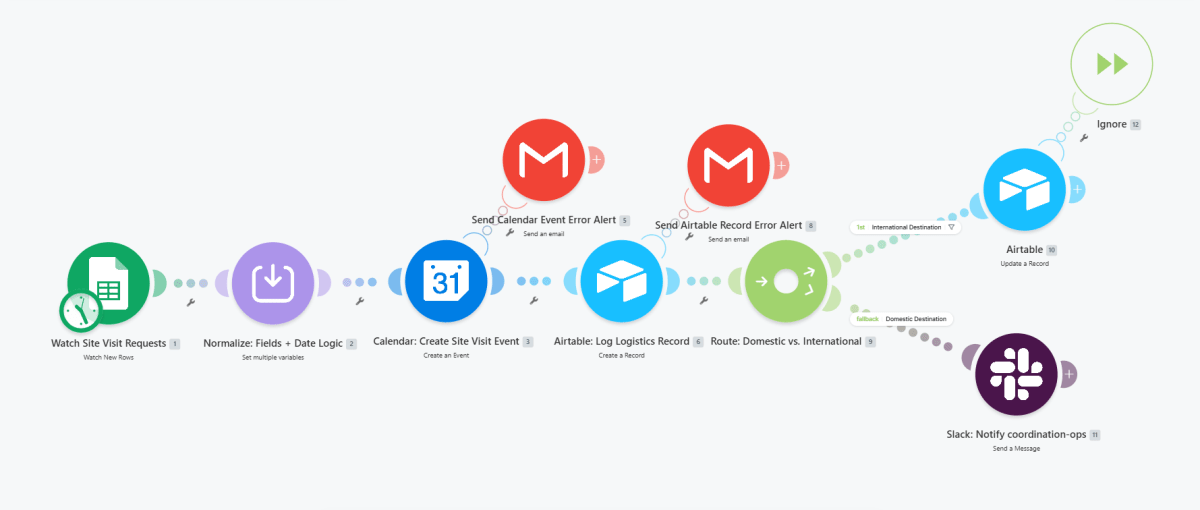
Scheduling workflow that watches site visit requests in Google Sheets, normalizes fields and date logic, creates a site visit event in Google Calendar, logs the logistics record in Airtable, and routes by destination type to update an international Airtable record or notify a domestic coordination team in Slack, with dedicated email alerts for calendar and Airtable failures.
Make · workflow canvasproduction build
Context
The team needed a single, automated path to schedule site visits, log logistics, and route follow-up actions by destination type without manual data entry or forwarding across tools.
Approach
Built a Make.com scenario that watches new rows in the site visit request sheet, normalizes the form fields and date logic, creates a Google Calendar event, writes a logistics record to Airtable, then branches on destination type into an international update path (Airtable record update) or a domestic path (Slack notification to coordination ops), with separate error‑alert emails for calendar creation and Airtable logging failures.
Architecture
Watch Site Visit Requests (Google Sheets)
Normalize: Fields + Date Logic
Calendar: Create Site Visit Event
Send Calendar Event Error Alert on failure
Airtable
Log Logistics Record
Send Airtable Record Error Alert on failure
Route
Domestic vs. International
International Destination: Airtable Update a Record
Domestic Destination
Slack: Notify coordination-ops
Ignore
no-op path
Results
~4 hrs/weekLogistics coordination time saved
Minutes, down from back-and-forth emailsSite visit booking time