Automated Fermentation Health Monitoring Assistant
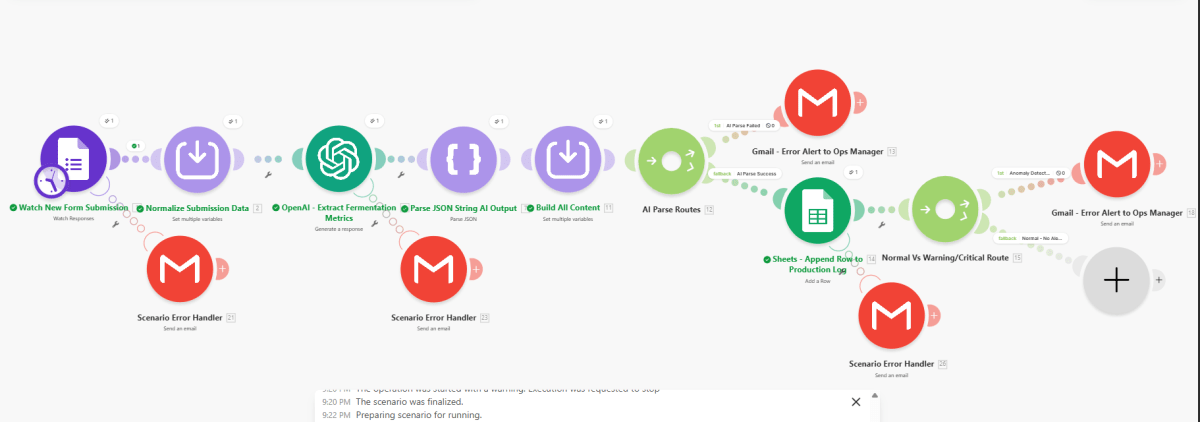
Fermentation‑health workflow that watches form submissions, normalizes data, uses OpenAI to extract fermentation metrics, parses the AI response into structured JSON, routes normal results to a production log sheet, and triggers email alerts to the ops manager when either the AI parse fails or an anomaly is detected.
Make · workflow canvasproduction build
Context
The fermentation team needed to monitor health metrics at scale without manual review of every submission, while still catching early‑stage anomalies and preserving a clear audit trail of every batch.
Approach
Built a single Make.com scenario that watches new fermentation health form submissions, normalizes the fields, sends them to OpenAI with a JSON‑structured prompt, parses the AI output into data, routes the result into either a normal production‑log path or an anomaly alert path, and wraps both the intake/AI leg and downstream logging with scenario error handlers that email the ops manager.
Architecture
Watch New Form Submission
Normalize Submission Data
OpenAI - Extract Fermentation Metrics
Parse JSON String AI Output
Build AI Content
AI Parse Routes
AI Parse Success: Sheets - Append Row to Production Log
Normal Vs Warning/Critical Route
Normal: no alert
Anomaly
Gmail - Error Alert to Ops Manager
AI Parse Failed: Gmail - Error Alert to Ops Manager
Scenario Error Handler watching intake/AI parsing and downstream paths
Results
~3 hrs/weekBatch review time saved
Minutes, down from manual log reviewAnomaly detection time