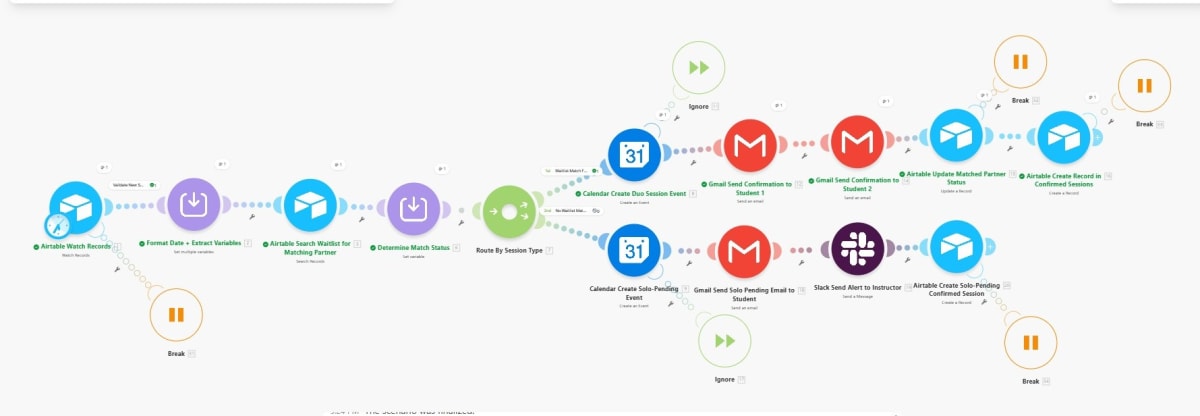
Make scenario that manages duo-session scheduling for a boutique Pilates studio by watching Airtable records, formatting dates and variables, searching the waitlist for a matching partner, creating a Google Calendar duo session event with Gmail confirmations to both students and updating Airtable when a match is found, or creating a solo-pending calendar event with Gmail notification to the student, Slack alert to the instructor, and Airtable record when no match exists, while ignoring unmatched or already-handled records and using Break modules to stop extra processing.
Make · workflow canvasproduction build
Context
A boutique Pilates studio needed to automatically match waitlisted clients into paired duo sessions, confirm matched students via email, and keep instructors informed when a session remains solo-pending while maintaining accurate records in Airtable and Google Calendar.
Approach
Built a Make scenario that watches Airtable records, formats dates and extracts matching variables, searches the waitlist for a compatible partner, determines match status, and routes into duo-session or solo-pending branches; matched pairs create a Google Calendar duo event, send Gmail confirmations to both students, update Airtable match status, and create a Confirmed Sessions record, while unmatched cases create a solo-pending calendar event, send a solo pending Gmail to the student, alert the instructor in Slack, and create a Solo-Pending Confirmed Session record; ignored records stop immediately and Break modules prevent extra downstream processing.
Architecture
Airtable Watch Records
Format Date + Extract Variables
Airtable Search Waitlist for Matching Partner
Determine Match Status
Route By Session Type
Match Found: Calendar Create Duo Session Event
Gmail Send Confirmation to Student 1 + Gmail Send Confirmation to Student 2
Airtable Update Matched Partner Status
Airtable Create Record in Confirmed Sessions
Break
No Match / Solo Pending
Calendar Create Solo-Pending Event
Gmail Send Solo Pending Email to Student
Slack Send Alert to Instructor
Airtable Create Record in Solo-Pending Confirmed Session
Break
Ignore
Ignore
Results
~3 hrs/weekScheduling time saved
Instant, down from manual lookupPartner match time